| .vscode | ||
| apps | ||
| compose | ||
| config | ||
| data | ||
| docs | ||
| notebooks | ||
| requirements | ||
| site | ||
| .dockerignore | ||
| .editorconfig | ||
| .env.example | ||
| .env.template | ||
| .gitignore | ||
| .gitlab-ci.yml | ||
| download_model.py | ||
| gpu_server.py | ||
| manage.py | ||
| package-lock.json | ||
| package.json | ||
| README.md | ||

Dynavera: Distributed Agentic Onboarding System
Dynavera is a multi-agent onboarding platform that combines role-specific training flows, retrieval from organization documents, and LLM-powered guidance. The system is intentionally distributed so that app orchestration and heavy inference can run independently.
Repository: https://git.cs.bham.ac.uk/projects-2025-26/vxn217
Table of Contents
- At a Glance
- Inspector & Supervisor Notes
- Screenshots
- System Architecture (High-Level)
- Project Goals
- Tech Stack
- Repository Guide
- Evaluation Credentials
- Recommended Evaluation Walkthrough
- Local Setup (Cross-Platform)
- Common Commands
- Additional Documentation
At a Glance
Dynavera focuses on one question: how do we deliver onboarding that is role-aware, context-aware, and operationally practical?
The platform does this by combining:
- A Django management layer for accounts, roles, sessions, and APIs
- An agentic orchestration loop over WebSockets for responsive interactions
- A retrieval layer using pgvector and organization-provided documents
- A GPU inference service for chat completions, embeddings, and chunking support
Inspector & Supervisor Notes
Primary locations relevant to technical quality, architecture reasoning, and evaluation:
- Setup, context, and high-level flow: this
README.md - Architecture notes:
docs/ - Orchestration runtime:
apps/onboarding/consumers.py - Retrieval bridge and tool routing:
apps/onboarding/mcp.py - Ingestion and vectorization pipeline:
apps/knowledge/tasks.py - Inference service entrypoint:
gpu_server.py
Evaluation-relevant themes represented in the codebase:
- Role-scoped onboarding generation and progression
- Retrieval grounding through uploaded training files
- Separation of management services and inference services
- End-to-end flow from upload to onboarding completion
Screenshots
Placeholder slots for final screenshots.
Home Page

Organization Page

Onboarding Loading / Generation State

Onboarding Content Flow

System Architecture (High-Level)
At a high level, Dynavera is split into a management side and an inference side. The orchestrator coordinates user interaction, tool calls, and model responses between the two.
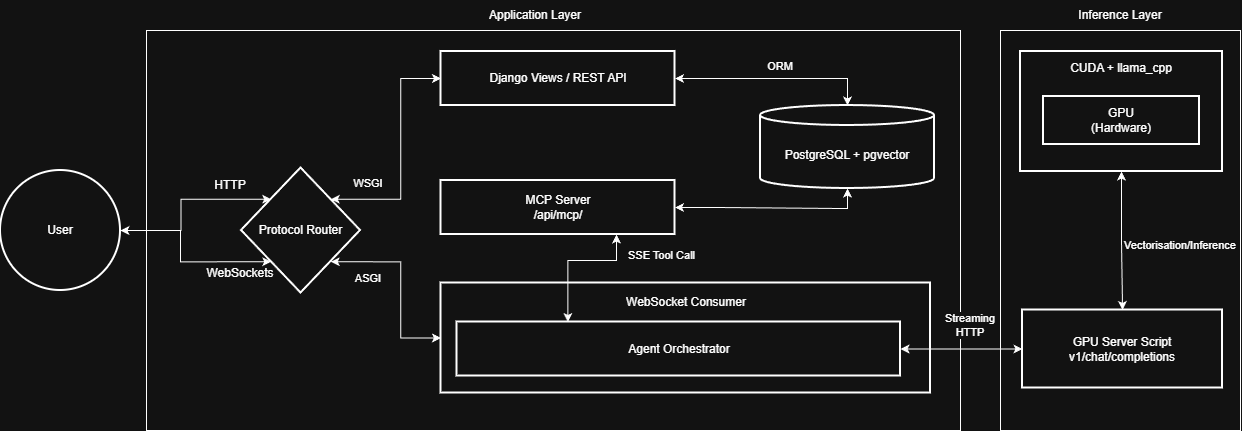
For the fuller architecture narrative (runtime flow and component placement), see:
Project Goals
- Distributed orchestration across VPS and GPU nodes
- Context-aware onboarding with RAG (semantic chunking + vector search)
- Stateful agent workflow over WebSockets
- Automated ingestion from role training documents (PDF/TXT)
Tech Stack
- Backend: Django, Django REST Framework, Django Channels
- Frontend: Vue 3, Vite, Pinia
- Database: PostgreSQL with pgvector
- AI/ML: FastAPI, Sentence Transformers, llama.cpp-compatible serving
- Infra: Docker, Redis, Celery
Repository Guide
Key areas in the repo:
apps/accounts: user model, organization/role ownership, membership flowsapps/knowledge: file ingestion, chunking pipeline, vector document persistenceapps/onboarding: role flows, sessions, websocket orchestration, MCP-style tool routingconfig/: settings, API/ASGI routing, environment wiringcompose/: development and production deployment manifestsgpu_server.py: inference and embedding service
For a more detailed breakdown:
Evaluation Credentials
| Role | Password | |
|---|---|---|
| Admin | admin@example.com | admin |
| Manager | haleisaac@example.com | password |
| User | j.thompson@example.com | password |
Manager registration code: MANAGER2026
Recommended Evaluation Walkthrough
- Open https://fyp.viswamedha.com
- Log in as Manager and open the target organization
- Upload a role-relevant document (PDF recommended)
- Wait for ingestion and embedding completion
- Start role onboarding and trigger generation
- Check if responses are grounded in uploaded material
- Optionally review progress details and logs
If the hosted deployment is unavailable, local setup is documented below.
Local Setup (Cross-Platform)
Prerequisites
- Docker Engine / Docker Desktop
- NVIDIA drivers + NVIDIA Container Toolkit (for GPU inference)
1) Clone
git clone https://git.cs.bham.ac.uk/projects-2025-26/vxn217
cd vxn217
2) Create .env
PowerShell
Copy-Item .env.template .env
CMD
copy .env.template .env
macOS/Linux
cp .env.template .env
Then update .env values for your environment.
3) Start services (development)
docker compose -f compose/dev/docker-compose.yml --env-file .env up -d --build
4) Access endpoints
5) Optional: reset seeded passwords
docker exec -it fyp-django-dev python manage.py reset_passwords
Reset defaults:
- Admin users:
admin - Manager and user accounts:
password
Common Commands
Stop services:
docker compose -f compose/dev/docker-compose.yml --env-file .env down
Tail logs:
docker compose -f compose/dev/docker-compose.yml --env-file .env logs -f
Run migrations:
docker exec -it fyp-django-dev python manage.py migrate